
Tetra
A falling-block puzzle game that runs right inside World of Warcraft. Waiting on a queue, a
ready check or a slow flight path? Type /tetra and start stacking.
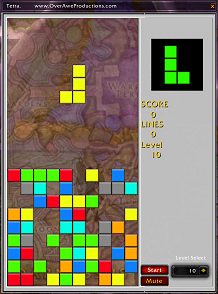
Seven Shapes, Twenty Rows, One Goal
Tetra is a puzzle game built from tetrominoes — groups of four blocks, of which there are only seven distinct shapes. Pieces drop onto a 10×20 board; slide and rotate them to complete full rows, which clear for points.
Every ten lines takes you up a level: the pieces fall faster and every point is worth more. When the stack reaches the top, the game is over — and one click posts your score to guild chat for bragging rights.
Three Ways to Play
Classic
The game you know. Blocks fall from the top; clear rows before the stack reaches the ceiling.
Up
The board is flipped, so blocks fall upward. Same rules, and your brain has to relearn every one of them.
Twist
Every time you clear a line, the board mirrors left-to-right. Plan your next placement for a board that's about to flip.
More Than Falling Blocks
Next & Saved Block
See the next piece coming, and keep a saved block in reserve. Swap them at any time to save a bad board.
Level Select
Start anywhere from level 1 to 20. Starting higher means faster drops, a bigger score multiplier, and a bottom half already littered with blocks.
Scoring That Rewards Big Clears
Points for every block you land, and much more for clearing several rows at once. Four lines in one drop is worth sixteen times a single, with its own sound to match.
Brag to Your Guild
When the game ends, hit Publish to post your lines, score, level and mode to guild chat.
Stays Out of the Way
A movable window that opens with /tetra and closes with a single key, plus a mute button for the sound effects.
How to Play
/tetra | Open the game window. |
← → | Move the block left or right. |
↑ / E | Rotate clockwise / counter-clockwise. |
↓ | Soft drop: move the block down faster. |
Z or 0 | Hard drop: slam the block straight down. |
` or . | Swap the next block with the saved block. |
Esc Space Enter | Close the window. R, W and / do too, so you're never stuck in a game when you need to move or chat. |
If Tetra has made a queue go by faster, you can support future TRK Studios projects directly: